The eye — putting repeats away
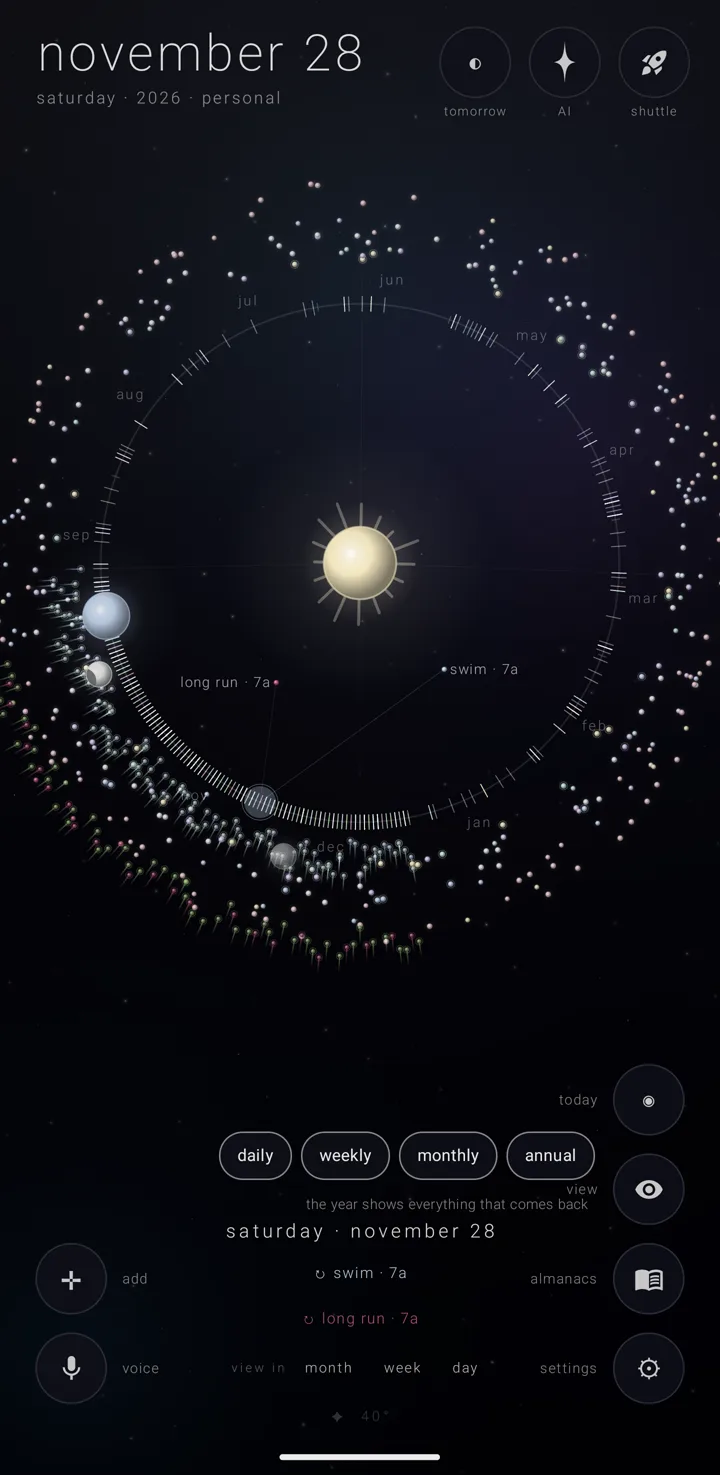
The eye is a corner button, labelled "view", that hides repeating commitments from the sky — the canvas the calendar is drawn on — so the rest is easier to see. It changes nothing about the commitments themselves. It only changes what is drawn.
A commitment is one thing you have to do. Some happen once; others repeat every day, week, month or year.
Where it is
The eye stands in the bottom-right column of corner buttons, above the book, "almanacs". It stands on every view — the day, the week, the month, the year and the years. See The year & the years.
On the shortest screens, where five buttons cannot stand in that column, the eye stands at the top of the bottom-left column instead, above ✛, the cross for adding.
Put a kind of repeat away
- Go to any view.
- Tap the eye, "view". Four pills appear: "daily", "weekly", "monthly" and "annual".
- Tap a pill to put that kind of repeating commitment away. The app says "‹kind› is away". Tap more pills to put more kinds away.
- Look at the eye. It shows a closed eye while anything is being put away.
A line under the pills says what the words do not: "annual is away · every holiday, and birthdays" while "annual" is off; "every view shows everything that comes back" while all four are on; otherwise "what happens once is always shown".
Bring them back
- Tap the eye, "view".
- Tap the pill again for each kind you want back. The app says "‹kind› returns".
The closed eye shows only while something is put away.
What to expect
- One choice for every view. Put "weekly" away on the day and it is away on the week, the month, the year and the years too. It stays away as you move between them until you bring it back from any of them.
- What is away can't be touched. It cannot be tapped or scrubbed onto in any view.
- Things that happen once stay. They have no pill and are always drawn. That is why the sky can stay busy with all four kinds put away: a full moon, an eclipse and a planet's turn each happen once.
- The fan follows the eye. The fan — the picked day's commitments, spread out toward the sun on the year view — leaves out any kind the eye is putting away.
- So does the brief. The brief — the picked day's list along the bottom — leaves out any kind the eye is putting away, in every view. See The day brief.
- Nothing is changed or lost. The commitments are still there, with every detail. They are only out of sight.
- It belongs to this phone's install only. The eye's choice is not in any backup, not on any settings page, and not in any export.
Zenith Tasks' stars — the fifth pill
While Zenith Tasks is on the phone and has shared at least one star with a due date, the eye holds a fifth pill after the four: "tasks". It starts on.
- On, the stars Zenith Tasks has given a due date show on their days in every view and in the brief.
- Off, they are gone from every view, and the eye shows a closed eye, as it does for the four.
Turning it says "tasks returns · its dated stars on their days" or "tasks is away". The line under the pills counts only the four.
If Zenith Tasks is uninstalled, the pill is gone, and it never leaves the eye closed.
A star is Tasks' own four-point star in the sky's own ink — never a commitment's dot, never an almanac's colour. A done star is dimmed and crossed out. Tap one to open it in Zenith Tasks. The calendar only shows the stars; nothing in it can change one. Where each view puts them: The day view, The week view, The month view, The year & the years and The day brief.
See also.
The orrery · The year & the years · What a commitment is · The sky